Sunday, January 24, 2010

5 Social Media Secrets That Work Effectively For Offline Networking

Social media has created an Internet phenomenon and has taken online networking to a dynamic level. Do you ever wonder why social media is so successful? It’s viral and it spreads quickly – just like word-of-mouth spreads quickly in offline networking.

When you meet people for the first time, take a few lessons from the social media gurus and apply their secret tactics to your offline networking strategy.

Secret #1- Social means both talking and listening. Listening is just as important as talking

When you interact on a forum or leave comments on a blog, you first read what the other person wrote and then you comment. If you constantly leave comments about yourself and don’t interact and comment off-topic, you will make a bad first impression. Other members will ignore you.

This same philosophy applies when you are first introduced to people. You want to learn about them and ask questions. How can you learn about a person if you are constantly talking about yourself? Pay attention, listen and ask appropriate questions according to the conversation topic.

Secret #2- Widgets that instantly find thousands of followers don’t always give the best return on investment

Social media gurus always tout the benefits of handy widgets that automate Facebook and Twitter followers. Do you realize that the 5,000 people you just added probably won’t be interested in your products or services? You just wasted time and money adding people who don’t care about what you’re pitching.

Use this same social media approach when you attend networking events and collect business cards. Don’t just pitch your products/services to just anyone you meet. Talk to people who might actually benefit from what you offer. It doesn’t make sense to attend a networking event filled with seniors if you are a nightclub owner whose target audience is 21 year-old college students.

Secret #3- Freebies don’t always mean more subscribers, BUT worthwhile freebies make all the difference

Freebies don’t always mean instant success. Contests don’t always draw thousands of new members to your site either. In the social media world, if you make your prize too abstract or unappealing, you will drive away visitors.

This social media tactic also applies to freebies offered in the offline world. If you attend networking events and conduct raffles or contests, make your prizes worthwhile for guests. Target your audience and get inside their heads. You want your guests to actually use the product or service you’re giving away.

• How will this freebie benefit the contest winner?

• Will this freebie make them contact me for more services or products?

Secret #4- Don’t scare away others with the “me me me” syndrome

If you start every blog comment or tweet with “I did” or “I want” then you are headed down the “me me me” syndrome path. Social media is all about helping others. Being an expert in your field doesn’t mean acting like an egomaniac.


Secret #5- Always use professional Net-iquette

Don’t come across as rude or condescending in your Facebook or Twitter updates. You never know who will come across your updates in the cyber world, and how it can come back to haunt you.

This tip should always be applied to offline networking. Always remember to practice professional, ethical etiquette whenever you meet new people. Think before you speak, and remember that you represent your company/business. First impressions make a lasting impression, so always put your best face forward.

If you liked this article, tell all your friends about it. They’ll thank you for it. If you have a blog or website, you can link to it.

Source: John Boyd of MediaWave
Friday, January 8, 2010

PortableApps.com Suite and PortableApps.com Platform


PortableApps.com Suite and PortableApps.com Platform
your computer, without the computer™

PortableApps.com Suite™ is a complete collection of portable apps including a web browser, email client, office suite, calendar/scheduler, instant messaging client, antivirus, audio player, sudoku game, password manager, PDF reader, minesweeper clone, backup utility and integrated menu, all preconfigured to work portably. Just drop it on your portable device and you're ready to go.

Choose Your Download 1.5.2 for Windows
Starting at only 1MB Download Details


Included apps:
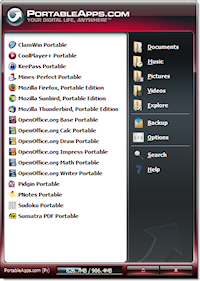
All versions of the PortableApps.com Suite include the integrated PortableApps.com Menu (pictured at right) and the PortableApps.com Backup utility along with a set of custom icons, an autoplay configuration, folders and a quick start shortcut. In addition, the packages include:

* Mozilla Firefox, Portable Edition (web browser)
* Mozilla Thunderbird, Portable Edition (email)
* Mozilla Sunbird, Portable Edition (calendar/tasks)
* ClamWin Portable (antivirus)
* Pidgin Portable (instant messaging)
* Sumatra PDF Portable (PDF reader
* KeePass Password Safe Portable (password manager)
* Sudoku Portable (game)
* Mines-Perfect Portable (game)
* CoolPlayer+ Portable (audio player)
* OpenOffice.org Portable* (office suite)
- Writer (word processor)
- Calc (spreadsheet)
- Impress (presentations)
- Base (database utility)
- Draw (drawing)

* The Light Suite includes AbiWord Portable (word processor) instead of OpenOffice.org Portable.

Thursday, January 7, 2010

Pioneer To Bring Pandora To Your Car In March

Look for it to get easier to listen to internet radio in your car as PANDORA has entered into a deal with electronics maker PIONEER CORP. that promises to get a built-in spot on dashboards for the new technology. "The development represents a direct challenge to broadcasters of satellite and traditional radio, who have long dreaded the arrival of Internet radio in cars," writes THE WALL STREET JOURNAL.

PIONEER is set to sell a navigation and entertainment device begining in MARCH that will allow PANDORA users who currently stream the service on their iPHONES to easily access PANDORA in their cars. "The $1,200 navigation system, announced at the CONSUMER ELECTRONICS SHOW in LAS VEGAS, will detect iPHONES and iPOD TOUCHES that have PANDORA installed, and put the consumer's Pandora settings on the navigation screen. That will allow drivers to hear their favorite PANDORA radio channels."

"Maybe a year ago people would have said PANDORA is a computer thing," said co-founder TIM WESTERGREN. Now, "they're beginning to realize that Internet radio is an anytime, anywhere thing."

So how serious a threat is this to terrestrial broadcasters? Many in the business have long felt in-car Internet services as the real threat to AM and FM radio, because they will allow drivers access to an unlimited number of streamed radio stations. PANDORA's deal with PIONEER is the beginning of that future.

Monday, June 22, 2009

Rain Gutters as Cable Management Tools


Creative cable management instantly drawn to reader Seandavid010's rain-gutter cable management setup.

Granted, you can find other cord-wrangling solutions but the rain gutter approach yields impressive results. Sean was nice enough to share his entire step-by-step, so here goes (everything below was written by Sean):

I recently purchased a new table from IKEA to use as a computer desk. I liked it because it was really long and narrow (78"x23") and would work perfectly for my wife and I. The problem I ran into was that I didn't want a bunch of cords and cables hanging down behind the table. Having that would ruin the new 'clean' aesthetic I was going for.


So I decided that I needed to find some solution to this cable-clutter problem. I looked at some of the commercial solutions available, but they all either seemed rather expensive, or they didn't really fit my needs very well. I had remembered reading somewhere about somebody using ordinary vinyl rain gutters in some way (I think they used bungee cords to suspend them from the underside of the table) but I couldn't really find anything to help me out, so I decided to try to solve it myself.


So I went out and purchased a 10 foot length of vinyl rain gutter and cut it to size. I also bought two end caps and four hangars (used to nail the gutter to the side of your house) and some fasteners. I figured I'd drill up into the bottom of the table, and drive in the lag screws. Then I'd attach them to the threaded hooks with joiner nuts, and hang the rain gutters from those. Easy. Job one, however, was to cut a notch in the gutter so it would fit around the middle leg of the table. Job two was to drill a hole in the hangars to attach the hooks. I also fitted the holes with rubber grommets to cut down on any excess noise they might produce.


After that, it was just a simple matter of doing a dry-fit:


Using the hangars to suspend the length of gutter turned out to be a good idea, since they can slide back and forth, meaning fitting it together was really easy.

Here's my workspace before I began the project. It's not really terrible, but it just all felt really pieced together. A flimsy computer desk and a plastic folding table shoved together with all those cables hanging down there. Besides not looking great, it was actually a pain to clean down there, and dust tended to accumulate.


And here's the after shot:


Notice: no cables hanging down. Everything - my power strips, wireless router, cable modem, usb cables and chargers for two Mac Books is all tucked away nice and clean underneath. The best part is that you can't even see it unless you're looking for it.

Nice and tidy. The table is also really great. It came unfinished, and I liked the color and texture so much that I just had a big piece of glass cut to go on top. The only problem is that now my mouse won't work anymore. Any good tips on making my own (visually appealing) mouse pad? I'd appreciate it.

Anyways, the total cost for the project came in at just over $30 and only took about two hours to complete.

Advocare Spark

Advocare Spark
A sugar-free source of energy